
Scheduling
Scheduling controls when content plays on your screens (devices/players) in Engage CMS.
In this article, you will learn how playlist scheduling and content scheduling work together, and how playback behavior is determined.
How Scheduling Works
Scheduling in Engage CMS works on two levels:
- Playlist Scheduling – controls when a playlist is active
- Content Scheduling – controls when specific media plays within a playlist
These work together to determine what is shown on a screen at any given time.
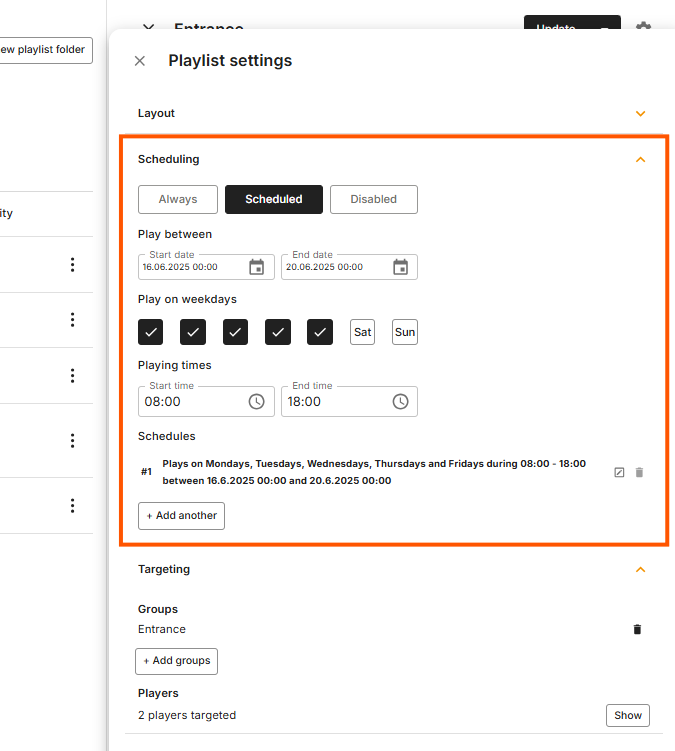
Playlist Scheduling
Playlist scheduling defines when a playlist should play.
You can set:
- Start and end dates
- Specific days
- Time ranges
A playlist must be active and scheduled to display content.
Content Scheduling
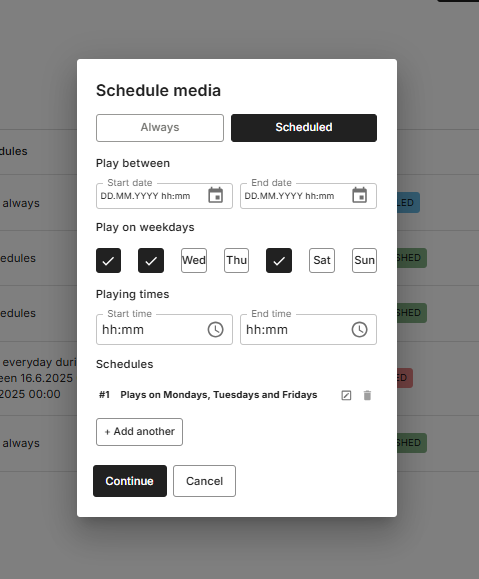
Content scheduling defines when individual media files play within a playlist.
You can:
- schedule specific files
- limit when content appears
- control playback within the playlist
How Scheduling Works Together
For content to play, both conditions must be met:
- The playlist must be scheduled
- The content must be scheduled with in the playlist playtimes
If either condition is not met, the content will not play.
Playback Behavior
Playback is determined by combining playlist and content schedules.
Scenario 1: Playlist scheduled, no content scheduling
- The playlist plays normally
- All content is included
Scenario 2: Playlist scheduled, content scheduled
- Only content matching the schedule will play
- Other content is skipped
Scenario 3: Content scheduled outside playlist schedule
- The content will not play
Scenario 4: Multiple playlists scheduled
- Playback is determined by playlist priority
- Higher priority playlists override lower ones
Scenario 5: No active content
- If no content matches the schedule, nothing will play
Important Scheduling Rules
- Content cannot play outside the playlist schedule
- Content scheduling refines playlist behavior, it does not replace it
- Playlist priority affects which playlist is shown
- Scheduling applies across all devices assigned to the playlist
Common Questions about Scheduling
Why is my content not playing?
The most common reasons are:
- the playlist is not scheduled
- the content is scheduled outside the playlist time
- another playlist with higher priority is active
What is the difference between playlist scheduling and content scheduling?
- Playlist scheduling controls when the playlist plays
- Content scheduling controls when individual items play within the playlist
Can content play if the playlist is not scheduled?
No. A playlist must be active and scheduled for any content to play.
Why is only some content playing in my playlist?
Some media may have content scheduling applied, limiting when it appears.
Can I schedule content independently from a playlist?
No. Content scheduling only works within an active playlist.
What happens if multiple playlists are scheduled at the same time?
The system uses playlist priority to decide which playlist is shown.
Why is my playlist active but nothing is showing?
There may be no content matching the current time, or all content is scheduled outside the active period.
Does scheduling work the same for all devices?
Yes, but playback depends on:
- assigned playlists
- scheduling
- device status (online/offline)
- Active Power Schedules or Special day groups